Everything Mother Hubbard's Cupboard does today.
Know what you have
Add to cupboard
Scan a barcode and the app fills in the name and brand, so putting the groceries away takes seconds.
Scan several
Scan a whole grocery run one item after another, then check it over and add it all at once, so unpacking doesn't turn into typing.
Add it yourself
Type in things without a barcode, like fresh meat or produce, so the cupboard holds everything you really have.
Fill in from a photo
Take a picture of a label and Alice fills in the name, brand and size, so a product the app doesn't know is still quick to add.
Automatic tidy-upFamily plans
When you add something new, Alice tidies its name and works out what kind of item it is, so its use-by date is set for you.
Leftover
Save a home-cooked leftover and where you put it, and see how many days old it is, so it gets eaten instead of forgotten.
Used and Tossed
Log what you use up or throw away, by scanning it or finding it by name, so the count at home stays true.
Item details
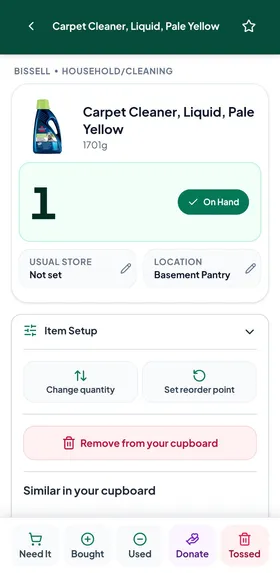
Every product has its own page with how many you have, where they are and when to use them by, so the answer is always one tap away.
Use-by dates
Each product gets a use-by date from what it is and where it's kept, and you can change it, so you know what to eat first.
Home
Home opens on what needs you today, and lets you browse by place, by favourites or by what changed last, so the whole cupboard is easy to see.
Favourites
Star the things your household always buys, so they're quick to find and you can see when they're running low.
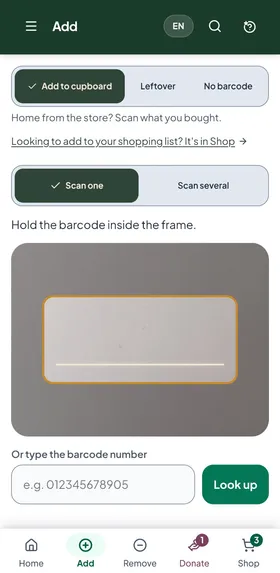
Scan one 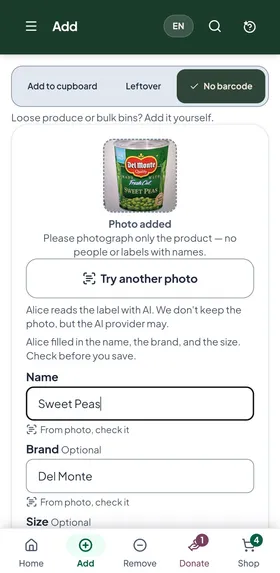
Fill in from a photo 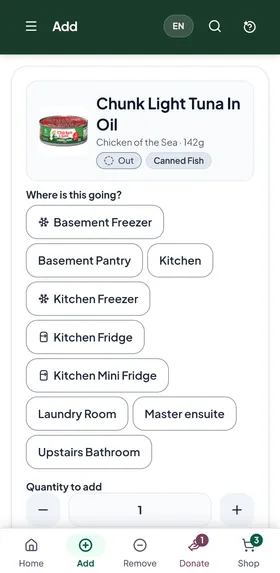
Where is this going? 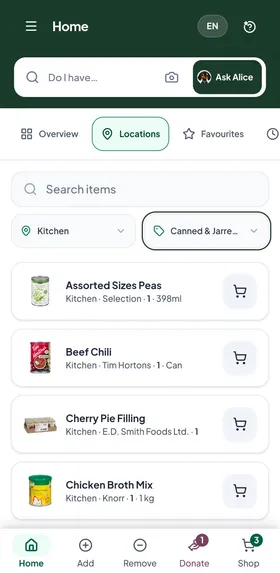
Home, by location
Stock smarts
Packs
When the app knows a product comes in packs, it counts them one by one, so two packs of 24 cans means 48 cans in the cupboard.
Half quantities
Used half a jar? Log a half, so the count stays honest.
One product, several places
Keep some in the fridge and some in the pantry, and it knows how many are in each.
Reorder point
Set one, and when you run low it adds itself to your list.
Check before you buy
Do I have it?
Type a few letters to see if you have something, how many and where, so the aisle question takes seconds.
Scan to check
In the store, scan the barcode to see if it's already at home, and if it isn't, what similar things you do have.
Ask Alice
Ask "Do we have chips?" by typing or out loud, and Alice answers from what's in your cupboard.
Similar in your cupboard
A product's page lists other things of the same kind you have, so a different brand of tuna still counts.
At home, Expiring and Similar
Items on your list are tagged when you already have some, when the one at home is close to its date, or when you have something like it, so you can see what to skip.
Maybe a duplicate
An item that's on your lists twice, even as two different brands, is flagged, so you don't buy it twice.
Show items you may already have
One tap narrows your list to the things you may not need, for a quick check before you leave.
Need It
Add a product to the list from its own page, and if you already have some it tells you how many first, so you only add it if you mean to.
Plan the shopping
One shared list
The whole household adds to the same shopping list from their own phones, so nobody shops blind.
Find or add an item
Type an item to find it on your lists or add it, with an Undo if you slip, so the list is quick to keep up.
Several lists
Keep more than one list and move items between them, so the weekly shop and the big monthly run stay separate.
Your stores
The list groups itself by the stores you use, in your order, then by category, so each trip goes in a straight line.
Tick it bought
Tick an item as you buy it and it goes straight into the cupboard, so there's nothing to enter when you get home.
Running low
Things at or below their reorder point that aren't on a list yet wait under your list, one tap each to add.
Favourites running low
Home shows the favourites that are out or low, one tap to put them on the list, so the staples never run out.
Buy again in…Family plans
It works out from the last 60 days when each item will run out, so you can buy it again at the right time.
Waste less
Needs attention
Home lists what's past its date or due within a week, most urgent first, so food gets eaten before it turns.
Forgotten but fineFamily plans
It finds shelf-stable things that have been in the house three months or more, so nothing gets lost at the back of the pantry.
Hold off buyingFamily plans
When you have more than six months' worth of something, it tells you to hold off, or offers to donate the extra.
What can I make?
Alice suggests recipes from what you already have and lists anything missing, so dinner uses up the cupboard first.
Ask Alice what we can make with this
On a food's page, ask Alice for a recipe that uses it, so something close to its date gets used up.
Saved Recipes
Keep the recipes your family likes, so they're there next time.
Tossed
What gets thrown away is logged apart from what gets used, so the household's waste is counted, not guessed.
At a Glance: the household by the numbersFamily plans
One page that shows:
- How many items and how many different products you have
- This week's added, used, tossed and donated, against last week, with an eight-week trend
- What you have, by category
- Where you keep your items
- What was tossed in the last 60 days, as a share of everything that left, and the most-tossed products
- Tossed out, week by week
- Worth a look: what needs attention, when to buy again, and what's been forgotten
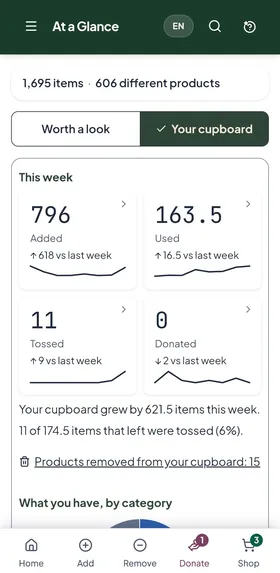
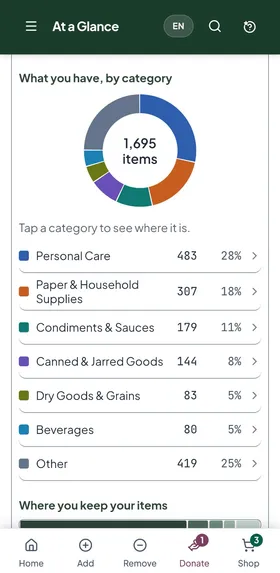
At a Glance: what you have, by category 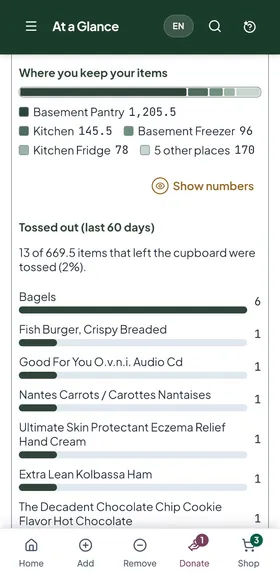
At a Glance: where it's kept, and what was tossed
Donate
Support Canada's Food Banks
Switch it on to add a Donate tab and buttons, so giving food away is as easy as tossing it.
Donate
From a product's page, set some aside to donate while it has at least a week left, so it can still do some good.
Donation Bucket
Everything set aside waits in one place, and after drop-off you mark it donated, so the cupboard stays right.
How to donate
Links to find a food bank near you and a short checklist of what they can take, so the drop-off goes smoothly.
Too close to donate
Anything set aside that gets within a week of its date comes off the donate list, so you only drop off food a food bank can use.
Ask Alice
Alice
Type or say a question about the app or your cupboard and Alice answers, so help is always there.
Ask Alice by voice
Tap the mic and ask out loud, and spoken questions get spoken answers, so your hands can stay full.
Questions about your cupboard
Ask "What's running low?" or "Do we need anything at Costco?" and she answers from the household's memory.
Do it
Ask Alice to add a favourite to the list, log something as used or set it aside to donate, and she checks with you before she does it.
Can I make…?
Ask if you can make a dish and she writes the recipe and tells you which ingredients you already have.
Your privacy
Questions with a name, email address or phone number in them are never sent, so your family's details stay private.
Something isn't working
Tell Alice when something's wrong and follow your request until it's sorted, so a problem doesn't go unheard.
AI policy
Everyone reads and agrees to a plain-language AI policy before Alice works for them, so nobody is opted in without knowing.
Setup and settings
Sign in with Google
Sign in with your Google account, so there's no new password to remember.
Setup
Four short steps (your places, your stores, what you have, and food bank donations) get the cupboard ready to use.
Take a tour
A short tour on each main screen shows what everything does, so nobody has to guess.
Stores and Locations
Set up the places you keep food and the stores you shop at, in your order, so the app matches your home.
Updates itself
New versions arrive on their own, at a moment that won't interrupt you, so you're always up to date.
On your home screen
Add it to your phone's home screen from the browser and it opens like any other app.
Opens without a signal
With no signal it still opens and shows your list as it last was, for a quick look in a basement store.
Your language
The whole app works in your household's language:
- English
- Français (Canada)
- Español
- 中文
- हिन्दी
- Filipino
Alice answers in the language you ask in.