
Never buy what you already own.
Mother Hubbard's Cupboard is your household's memory. It knows what you have and where it is — the pantry, the fridge, the basement freezer, even the laundry room — so your family stops overbuying, stops wasting, and shops with facts.
Sound familiar?
You get home with 4 cans of beans. You open the cupboard. There are six already.
It's not the money that stings. It's knowing better.
Twice a year there's the freezer cleanout — the forgotten leftovers, the frostbitten mystery meals, the garbage bag of good intentions. That one's guilt, not annoyance.
Same disease: a household that can't see what it owns.
What it does — and what your family gets
It remembers everything you have, everywhere it is.
Pantry, fridge, basement freezer, garage freezer — every location, every quantity. Your family gets the end of the beans moment: no more discovering the overbuy at home, too late.
It answers the aisle question in seconds.
"Do I have it?" — what you have, where it is, how much. Your family gets the discipline victory: see it on sale, check, and either buy with confidence or leave it on the shelf. FOMO stops winning.
It watches the dates so you don't have to.
It shows you what's close to its date, not a garbage bag twice a year. Your family gets food that gets eaten instead of tossed — and the end of freezer-cleanout shame.
It tells you what to cook with what you have.
Recipes built from your actual cupboard — and when something's getting close, it suggests recipes that use it up. Your family gets dinner ideas and less waste in the same breath. As one of us puts it: "You have something getting close to its best buy date, show me a recipe and I'll use it. Maybe donate. Anything but throw it out."
It makes donating as easy as tossing.
When it's too late for your household but not too late to give, one flag routes it to donation. Your family gets the better ending: most food gets eaten, some gets donated, very little gets thrown away.
It keeps the whole family on the same list.
Everyone adds to one shared, always-current list from their phone — no more "did anyone get milk?" Your family gets fewer duplicate buys and nobody shopping blind.
Alice answers the small questions.
"Do we have chips?" — anyone in the family can ask, and get an answer from the household's memory. She's in the background, called when needed.
How it works in real life
Do I have to type in everything I own?
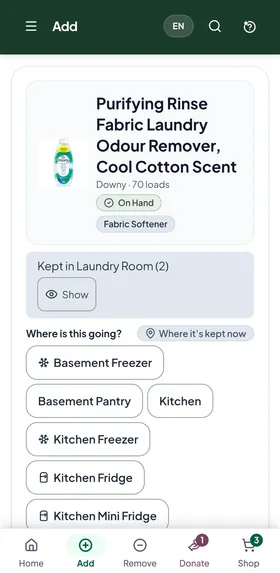
No. Scan the barcode and the app fills in the name and brand for you. You just confirm it and choose where it's going. Unpacking groceries? Scan them one after another. Things without a barcode, like fresh meat or produce, you add by name. And you don't have to do it all in one day: start with the freezer or the pantry, and the rest comes in as you shop.
I'm in the store holding a can of tuna. Do I have it?
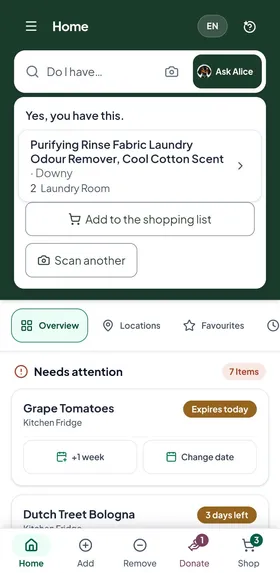
Scan it, type "tuna," or just ask Alice. You'll see how many you have and where they are. If there's a different tuna at home, it tells you that too.
Will it tell me my list is longer than it needs to be?
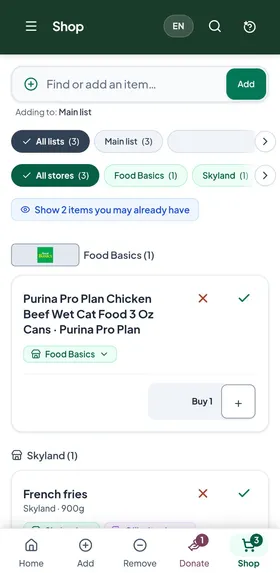
Yes. On your list, anything you may already have is tagged: "At home" when you have some, "Expiring" when the one at home is close to its date, and "Similar" when you have something like it. Tap a product's tag to go straight to its page and see what you have. Tap "Show items you may already have" to see just those, and skip what you don't need. On the Family plans, when you're stocked well past what you'll use in six months, it also tells you to hold off, or to donate the extra.
Why not just a list on the fridge?
A paper list tells you what you need. It can't tell you what you have.
- The list stays on the fridge. Your phone is with you in the aisle.
- Paper doesn't know what's in the basement freezer. The app knows every shelf, every freezer, and how many.
- Paper has one pen. With the app, everyone in the family adds from their own phone.
- Paper won't stop you buying a seventh can of beans. The app tells you when you already have some.
- Paper doesn't notice what's getting old. The app shows you what's close to its date, and finds a recipe to use it up.
If a list on the fridge works for you, keep it. If you keep coming home with things you already had, this is what the app is for.
Is this for you?
This is for you if you get home with four cans of beans, see six on the shelf, and it annoys you — not the money, the failure. You knew better.
It's for you if you're frugal, hate waste, and like knowing exactly what you've got.
It's not for you if you don't know what's in your fridge and you don't care. The app only works for people who want to know — and we're not going to pretend otherwise.
Need to know even more?
There's a lot more in the app. Here's everything it does today.